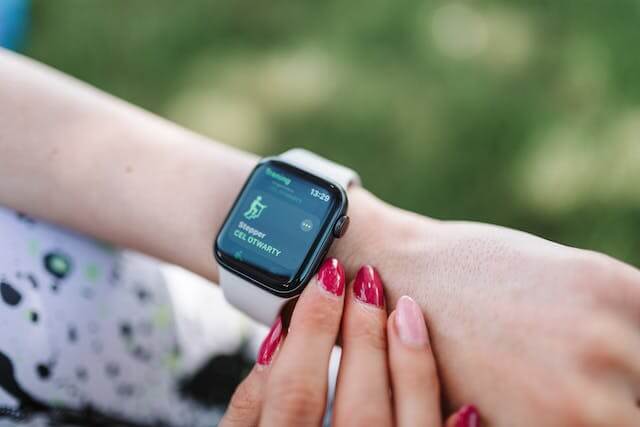
The Apple Watch Series 6 44mm is a 2020 smartwatch with an always-on Retina display, GPS, heart-rate sensors, ECG, a blood oxygen sensor, and optional cellular connectivity. In 2026, it is mainly a used or refurbished purchase rather than a current Apple Watch. Its hardware can still handle everyday notifications, workouts, and selected health features, but its age, battery condition, and software support limit its long-term value.
This guide reviews the 44mm model for US buyers, explains its original specifications, software compatibility, health features, real-world battery considerations, and what to inspect before buying one second-hand. It also explains who may still find it useful and when a newer Apple Watch is the better investment.
Written by Abdul Khader, researcher and writer at Top Reviewd. Last updated: November 5, 2026
Quick Answer: Is the Apple Watch Series 6 44mm Worth Buying in 2026?
The Apple Watch Series 6 44mm can still be a reasonable low-cost option for an iPhone owner who wants an always-on screen, basic workout tracking, notifications, and ECG. It is not a good choice at a price close to newer models, or if you want several more years of major watchOS updates. Series 6 supports watchOS 26 but is not on Apple’s watchOS 27 compatibility list. For a used unit, battery health, Activation Lock removal, and a return option matter more than the original feature list.
Key Takeaways
- The 44mm case measures 44 × 38 × 10.7mm and has a 368 × 448-pixel always-on Retina display.
- Apple’s original battery estimate was up to 18 hours. A five- or six-year-old battery may last much less.
- Series 6 can run watchOS 26, but it is excluded from watchOS 27.
- Apple Watch works with iPhone, not Android. The latest watchOS 26 update path requires a compatible newer iPhone.
- ECG, blood oxygen, and heart-rate features have specific limits and are not a substitute for medical care.
- Buy used only after checking battery health, Activation Lock, model variant, charging, and the seller’s return policy.
Apple Watch Series 6 44mm: Main Specifications
| Specification | Apple Watch Series 6 44mm |
|---|---|
| Release generation | 2020 |
| Case size | 44mm tall, 38mm wide, 10.7mm deep |
| Display | Always-On Retina LTPO OLED, 368 × 448 pixels, 977 sq mm display area, up to 1,000 nits |
| Processor | Apple S6 SiP, 64-bit dual-core |
| Storage | 32GB |
| Weight | Aluminum 36.5g, stainless steel 47.1g, titanium 41.3g, excluding the band |
| Connectivity | GPS/GNSS, Wi-Fi, Bluetooth 5.0; LTE and UMTS on GPS + Cellular models |
| Sensors | Third-generation optical heart sensor, electrical heart sensor, blood oxygen sensor, accelerometer, gyroscope, compass, always-on altimeter, ambient light sensor |
| Health and safety | ECG app, heart-rate notifications, Blood Oxygen app, Emergency SOS, fall detection, Noise app |
| Water resistance | 50 meters under ISO 22810:2010, intended for shallow-water activities |
| Original battery estimate | Up to 18 hours, depending on use and battery condition |
| Software support in 2026 | Compatible with watchOS 26; not compatible with watchOS 27 |
These are Apple’s original hardware specifications. Battery capacity, water resistance, cellular eligibility, software condition, and the accessories included can differ on a used or refurbished watch. Verify the exact model and condition before paying.
44mm Case Size, Dimensions, and Fit
The 44mm Series 6 has a case measuring 44mm high, 38mm wide, and 10.7mm thick. The aluminum version weighs 36.5g without the band. Stainless steel is heavier at 47.1g, while titanium weighs 41.3g. The larger 44mm model has a 977 sq mm display area, compared with 759 sq mm on the 40mm version.
44mm vs. 40mm: Which Size Should You Choose?
Choose the 44mm model if you prefer a larger display, need more room for text and controls, or have a medium-to-large wrist. The 40mm version is smaller and lighter, and may sit more comfortably on a narrow wrist. Both sizes have the same core Series 6 platform and most of the same features, so fit and screen preference should guide the choice.
The 44mm option is easier to read and provides more room for tapping, but it can feel large on a narrow wrist. Try the case with the band you intend to use, and check for comfortable sensor contact without tightening the strap excessively.
Always-On Retina Display
The Series 6 uses an always-on Retina LTPO OLED display with a stated peak brightness of up to 1,000 nits. The screen can remain visible at a dimmed level when your wrist is down, so you can glance at the time and selected watch-face information without raising your arm. Brightness and readability still depend on the setting, watch face, glass condition, and surrounding light.
S6 Processor, Storage, and Everyday Performance
The S6 SiP is a 64-bit dual-core processor, and the watch has 32GB of storage. For supported apps, notifications, timers, workouts, and everyday watch functions, the hardware remains capable. However, newer watchOS releases and apps may add requirements or features that Series 6 cannot use. Its age and software ceiling matter more to a buyer in 2026 than the original launch-day speed claims.
GPS vs. GPS + Cellular
Both versions include GPS/GNSS for outdoor location recording. The GPS + Cellular model adds LTE and UMTS hardware, which can support calls, messages, and data away from the iPhone when the watch is activated with a supported carrier and eligible plan. The GPS model relies more heavily on a nearby iPhone or Wi-Fi for connected functions. Cellular support, carrier compatibility, and plan fees should be checked before buying a used model.
Software Compatibility and watchOS Support in 2026
Series 6 launched with watchOS 7 and can run watchOS 26. It is not included in Apple’s watchOS 27 compatible-model list, so watchOS 26 is its last supported major watchOS generation as of November 5, 2026. This does not mean every watchOS 26 feature is available on Series 6, and future app requirements may leave older hardware behind.
Apple’s update guidance says installing watchOS 26 requires an iPhone 11 or later, or iPhone SE (3rd generation) or later, running iOS 26. Apple Watch is not compatible with Android phones. Check Apple’s current Apple Watch Software Update Requirements and watchOS Compatibility List before buying or attempting an update.
Battery Life and Charging
Apple rated the Series 6 for up to 18 hours of battery life when new. That figure is an estimate under Apple’s test conditions, not a promise for a used watch. GPS workouts, calls, cellular use, music, always-on display settings, and battery ageing can shorten the time between charges. A five- or six-year-old battery may have significantly less capacity than it had when new.
Before buying a second-hand unit, open Settings on the watch, tap Battery, then Battery Health, and check Maximum Capacity. Ask the seller to show this screen in person or in a recent video. A percentage alone does not guarantee a full day of use, so test the watch during a return period if possible. Read Apple’s Apple Watch Battery Health Instructions for the steps.
ECG, Heart Rate, and Irregular Rhythm Notifications
The electrical heart sensor enables the ECG app on supported Series 6 devices, while the optical sensor tracks heart rate. The ECG app can record a single-lead-style tracing and check for signs consistent with atrial fibrillation in supported circumstances. It does not detect heart attacks, strokes, blood clots, high blood pressure, or every type of arrhythmia. ECG availability and feature versions also vary by country or region, and the app is not intended for people under 22.
Irregular rhythm notifications are occasional checks, not continuous heart monitoring. They are not designed for people already diagnosed with atrial fibrillation and may not detect every episode. If you receive an alert, discuss it with a qualified healthcare professional. Do not delay emergency care because a watch reports a normal result. See Apple’s ECG App Guidance and Heart Health Notification Guidance. Our guide to Smartwatches for Heart Problems explains what wearable heart features can and cannot tell you.
Blood Oxygen Monitoring and US Availability
Series 6 introduced a blood oxygen sensor and the Blood Oxygen app. Availability can depend on country, device configuration, and software. Apple describes the readings as wellness information, not measurements for medical diagnosis or treatment. If buying a US used unit, confirm that the app is available and working on that exact watch rather than assuming every second-hand listing has an identical setup.
Apple’s redesigned US blood oxygen experience announced for selected later models in 2025 does not mean every Apple Watch generation has the same app behavior. Check Apple’s current Blood Oxygen App Availability and Instructions for regional and model-specific details.
Fall Detection, Emergency SOS, and Other Sensors
Series 6 includes fall detection, Emergency SOS, a compass, an always-on altimeter, an accelerometer, and a gyroscope. Fall detection can attempt to contact emergency services after a detected hard fall when the feature is enabled and the required connection is available. It may not identify every fall or accident. Emergency features should be configured before they are needed and should not be treated as a guaranteed rescue service.
Water Resistance and Swimming
Apple rates the Series 6 as water-resistant to 50 meters under ISO 22810:2010 for shallow-water activities such as swimming in a pool or ocean. Apple says it should not be used for scuba diving, waterskiing, or other high-velocity water activities or deep submersion. Water resistance can diminish over time and cannot be restored or checked visually. Be especially cautious with a used watch that may have been dropped, opened, or repaired.
Apple Pay, Notifications, and Everyday Tools
Series 6 supports Apple Pay, calls and messages through a paired iPhone or cellular plan, app notifications, timers, alarms, music controls, and selected third-party apps. Apple Pay depends on a supported bank or card issuer and the user’s region. Some functions require the iPhone to be nearby, while cellular models can perform additional tasks independently after carrier activation.
Pros and Cons of Apple Watch Series 6 44mm
Pros
- Large 44mm always-on Retina display.
- GPS, compass, and always-on altimeter.
- ECG and heart-rate sensors on supported models and in supported regions.
- Blood oxygen sensor and fall detection hardware.
- Apple Pay, speaker, microphone, and Emergency SOS.
- GPS + Cellular version is available for supported carriers.
Cons
- It is an older 2020 model and is no longer sold as a current-generation watch by Apple.
- It does not support watchOS 27, limiting its future software path.
- Battery health can be substantially reduced on used units.
- Original 18-hour battery estimate is modest compared with some fitness watches.
- Apple Watch requires an iPhone and is not an Android smartwatch.
- Some health features vary by country and are not medical diagnostic tools.
Is the Apple Watch Series 6 44mm Still Worth Buying in 2026?
It can be worth considering as a low-cost used Apple Watch if you already own a compatible iPhone, want the always-on display and basic health or fitness features, and find a well-maintained unit with documented battery health. Its 44mm screen, GPS, ECG hardware, Apple Pay, and notifications remain useful for everyday tasks.
However, Series 6 is at the end of its major watchOS support path. It is not compatible with watchOS 27, and older hardware may lose access to future app features as developers raise their requirements. Do not pay a premium simply because the original watch had high-end features when new. Compare the total cost with a newer refurbished model that supports the current watchOS generation.
Who May Still Be Happy With It?
- An iPhone owner who wants an inexpensive watch for notifications, activity records, timers, and basic apps.
- A buyer who specifically wants a 44mm always-on display or ECG hardware at a low used price.
- Someone who accepts daily charging and a shorter remaining software-support window.
Who Should Choose a Newer Model?
- Anyone who wants several more years of major watchOS updates and newer software features.
- People who need a strong battery and do not want to budget for a battery service.
- Buyers whose used Series 6 price is close to a newer supported Apple Watch.
- People who use Android, since Apple Watch does not pair with Android phones.
Used Apple Watch Series 6 Buying Checklist
Because every Series 6 is an older device, inspect the actual watch rather than relying on the seller’s description or the original product specifications. Complete these checks before the return period expires.
1. Check Battery Health
On the watch, open Settings, tap Battery, choose Battery Health, and look at Maximum Capacity. Ask for a clear screenshot or check it in person. A higher maximum-capacity percentage is generally preferable, but it is not a guarantee of a full day of runtime. Test the watch with your normal notifications and a short workout if possible. Ask whether the battery has been serviced and request documentation if the seller claims it has.
2. Make Sure Activation Lock Is Removed
The previous owner must unpair the watch and remove it from their Apple Account. If Activation Lock remains enabled, you may be unable to pair and use the watch with your own iPhone. Do not accept a promise that the seller will remove the lock later. Complete setup with your iPhone before finalizing the purchase when possible. See Apple’s Apple Watch Activation Lock Instructions.
3. Confirm the Exact Model and Cellular Status
Check whether the listing is for the 44mm GPS or GPS + Cellular version, and confirm the case material. If you want cellular service, verify the model’s eligibility with your US carrier and ask whether it is free of carrier or account restrictions. Do not pay extra for LTE hardware if your carrier cannot activate it.
4. Test the Screen, Crown, Buttons, Speaker, and Microphone
Look for cracks, deep scratches, dead pixels, screen burn-in, and signs of liquid or impact damage. Rotate and press the Digital Crown, test the side button, check haptics, play audio through the speaker, and make a test call or voice recording. Confirm that touch input works around all edges of the display.
5. Test Charging, GPS, Sensors, and Pairing
Bring a compatible charger and confirm that the watch charges consistently. Pair it with your iPhone, open the Workout app, test an outdoor GPS session, and check heart-rate readings. Make sure the watch can install available updates and sync with the Watch and Health apps. Check the band, charger, and included accessories against the seller’s listing.
6. Do Not Assume a Used Watch Is Still Waterproof
Water resistance can diminish with age, impact, or prior repairs, and a visual inspection cannot confirm the seals are intact. Avoid testing an older used watch by submerging it. If swimming is important, consider a newer device with a known service history or warranty coverage, and follow Apple’s water-use guidance.
Apple Watch Series 6 44mm vs. Newer Apple Watch Options
The most important difference in 2026 is not only speed or screen size. It is the remaining software life, battery condition, and access to newer features. Series 6 supports watchOS 26 but is excluded from watchOS 27. Newer supported generations offer a longer runway, although features differ by model and price.
| Buyer Priority | What to Consider |
|---|---|
| Lowest upfront cost | Series 6 may make sense if battery health is documented, Activation Lock is removed, and the seller offers returns. |
| Longer software support | Compare a newer watch on Apple’s current watchOS 27 compatibility list, such as Series 9 or later or SE 3. |
| More recent health capabilities | Check the feature list for the newer model you are considering. Newer health features are not automatically available on Series 6. |
| Multi-day battery life | Compare the actual battery estimates and independent tests of fitness-focused watches, not just another standard Apple Watch. |
For current model support, consult Apple’s watchOS 27 Compatibility List. For help choosing a current wearable, see our guides to Smartwatches for Activity Tracking and Smartwatches for Calls and Texting.
Frequently Asked Questions About Apple Watch Series 6 44mm
Is the Apple Watch Series 6 44mm Still Worth Buying in 2026?
It can be worth buying at a low used price if the battery is healthy, Activation Lock is removed, and you understand that it does not support watchOS 27. If a newer compatible model costs only a little more, the newer watch is usually the safer long-term purchase.
Does Apple Watch Series 6 Support watchOS 27?
No. Apple lists Series 6 as compatible with watchOS 26, but it is not included in the watchOS 27 supported-model list. As of November 5, 2026, watchOS 26 is the latest major version supported by Series 6.
Which iPhone Is Required to Update Apple Watch Series 6?
For the watchOS 26 update path, Apple requires an iPhone 11 or later, or iPhone SE (3rd generation) or later, running iOS 26. Requirements can change with software updates, so check Apple’s current update instructions before buying an older watch.
Does Apple Watch Series 6 44mm Work With Android?
No. Apple Watch is designed to pair with an iPhone and does not offer normal setup and use with Android phones. If you use Android, choose a compatible Wear OS, Samsung, Garmin, or other smartwatch instead. Our guide explains How to Connect a Smartwatch to Android or iPhone.
Does Apple Watch Series 6 Have ECG?
Yes. Series 6 includes an electrical heart sensor and supports the ECG app in supported countries and regions. The app creates a single-lead-style ECG and can classify certain rhythm patterns, but it cannot detect heart attacks, strokes, or every heart condition. Apple says the ECG app is not intended for people under 22.
Does Apple Watch Series 6 Have Blood Oxygen Monitoring?
Series 6 includes a blood oxygen sensor and supports the Blood Oxygen app where available. Apple says these readings are for general fitness and wellness, not medical diagnosis or treatment. Regional availability and the exact software experience can vary, so verify the feature on the specific watch before purchase.
Can Apple Watch Series 6 Make Calls Without an iPhone?
The GPS + Cellular version can make calls away from the iPhone after activation with a compatible carrier and plan. The GPS-only model generally needs a nearby iPhone or a supported Wi-Fi connection for connected calling features. Carrier support and service charges vary.
How Long Does the Apple Watch Series 6 Battery Last?
Apple’s original estimate was up to 18 hours. Actual runtime depends on settings and activity, and a used battery may have less capacity after years of charging. Check Settings, Battery, Battery Health, and Maximum Capacity before buying a second-hand unit.
Can You Swim With Apple Watch Series 6?
Apple rated Series 6 for 50-meter water resistance for shallow-water activities such as pool or ocean swimming. It is not intended for scuba diving, waterskiing, or high-velocity water. On an older used watch, do not assume the seals still provide the original level of resistance.
Is the 44mm Apple Watch Series 6 Too Large for a Small Wrist?
It depends on your wrist circumference and preferred fit. The 44mm case has a larger display but is wider and heavier than the 40mm version. Try it on if possible, and compare the case width, thickness, and band adjustment. See our guide to Smartwatches for Small Wrists.
How Do I Check Battery Health on a Used Apple Watch Series 6?
On the watch, open Settings, tap Battery, select Battery Health, and review Maximum Capacity. Ask the seller for access to this screen before you pay. Also test charging and real-world runtime because maximum capacity is only one part of the watch’s condition.
Editorial Note
This is a specification and buying guide, not a hands-on test of a newly purchased or refurbished Series 6 unit. Hardware details are based on Apple’s published technical specifications. Used-device advice reflects practical checks that buyers can complete before purchase. Battery performance and feature availability vary with condition, region, software, and carrier. We do not claim that every used watch will perform like a new device.
Trusted Sources
- Apple Watch Series 6 Technical Specifications
- Apple Watch Software Update Requirements
- Apple watchOS 27 Supported Models
- Apple Watch Battery Health Instructions
- Apple Watch Activation Lock Guidance
- Apple ECG App Guidance and Limitations
- Apple Blood Oxygen App Availability and Limitations
- Wareable 2026 Apple Watch Buying and Upgrade Guide
How This Guide Is Researched and Kept Current
We check Apple’s published specifications, support documents, software compatibility information, and instructions for health and safety features. We also review current independent buying guides to understand how older Apple Watch models are evaluated in the US used and refurbished market. Manufacturer specifications are distinguished from editorial buying advice and from the condition of any second-hand device.
Apple changes software support, feature availability, carrier requirements, and service options over time. We revisit this guide when official documentation or meaningful product-support changes affect the advice. The update date reflects an editorial review, not a claim that every watch was physically tested. Readers can report errors or outdated information through our Contact Us page.
About the Author
Abdul Khader is a watch enthusiast, researcher and writer, and the person behind Topreviewd. He writes about luxury and designer watches, automatic and quartz movements, materials, sizing, straps, crystals and water resistance, comparing watches across different price points so readers can judge what they get for the money. His approach is practical. He checks specifications, points out when sources disagree, and keeps published details separate from his own opinion. Read more on the About Page, or reach him through the Contact Us page.