A user-friendly smartwatch should make everyday tasks easier, not bury simple actions under complicated menus. A good model can show calls and messages, track activity, record selected health and sleep trends, provide navigation prompts, and let you control compatible phone features from your wrist. The exact functions depend on the watch, phone, software, region and sometimes a paid subscription.
The best smartwatch for ease of use is not necessarily the one with the most sensors or apps. It is the one that is comfortable, easy to read, simple to navigate, compatible with your phone and reliable for the few functions you will use every day. This guide explains the most useful features, the limitations to understand and what to check before buying in the United States.
Quick answer: Prioritize an intuitive interface, clear display, reliable notifications, comfortable fit, battery life that suits your routine, dependable phone compatibility and the health or fitness features you genuinely need. Treat health readings as wellness information, not a substitute for medical tests or professional advice.
Written by Abdul Khader, researcher and writer at Top Reviewd. Last updated: November 4, 2026
Five Smartwatch Features That Make Everyday Use Easier
1. Fitness and Activity Tracking

Fitness tracking is useful when it helps you notice patterns and stay consistent. Depending on the model, a smartwatch may record:
- Daily steps and active minutes
- Heart rate during rest and exercise
- Workout duration, pace and estimated distance
- GPS routes on supported outdoor activities
- Estimated calories and activity goals
- Sleep duration and estimated sleep stages
- Workout reminders, automatic activity detection and progress summaries
Not every watch includes built-in GPS, automatic workout detection or the same range of exercise modes. Some models use your phone’s GPS, while others contain their own receiver. Check whether the watch can record the activities you do most often and whether it needs the phone nearby.
Fitness and sleep readings are estimates. Step counts, calorie estimates, sleep stages and heart-rate measurements can vary with fit, movement, skin contact, workout type and device algorithms. Use them to follow trends over time rather than treating every number as exact. For more detail, see our guide to Smartwatch Fitness Tracking.
A smartwatch should not be relied on as a general blood-pressure monitor or blood-glucose meter. The FDA warns against using unauthorized wearable features that claim to measure or estimate blood pressure, and it says smartwatches and smart rings have not been authorized to measure blood glucose on their own. Use an appropriate authorized medical device and speak with a health professional when accurate measurements matter.
2. Calls, Messages and Useful Notifications
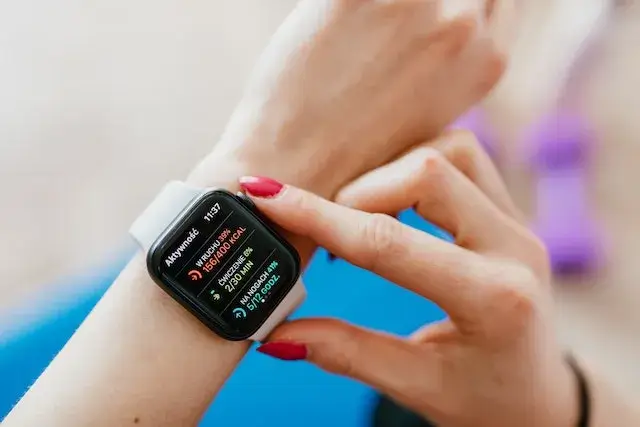
Notifications are among the most immediately useful smartwatch features. When the watch is paired with your phone, it can show call alerts, text messages, calendar reminders, email and selected app notifications. This lets you decide whether something needs attention without pulling your phone out every time it vibrates.
Some watches let you answer calls from the wrist, send short replies, dictate a message or use preset responses. These options depend on the watch, phone, app and connection. A watch with a microphone and speaker may handle calls when the phone is nearby, while a cellular model may support calls without the phone under an eligible carrier plan.
A user-friendly setup lets you choose which apps can interrupt you. Turn off low-priority alerts, use Focus or Do Not Disturb modes when needed, and keep only important notifications on the watch. Too many alerts can make a smartwatch more distracting instead of more helpful.
3. Sleep Tracking and Recovery Trends
Many current smartwatches estimate sleep duration and patterns using movement and other sensor data. Depending on the model, an app may display sleep stages, overnight heart-rate trends, blood-oxygen estimates, breathing-related information or a sleep score.
These summaries can help you notice whether your sleep schedule is consistent and how late nights, exercise or travel affect your routine. They do not provide a clinical sleep study, and stage estimates such as REM or deep sleep should not be treated as exact measurements or a diagnosis of a sleep disorder.
For overnight tracking, check battery life, charging time and whether the watch is comfortable enough to wear while sleeping. Some devices need a minimum battery level before starting sleep tracking, and some advanced insights require a subscription.
4. Music Playback and Phone Controls
Many smartwatches let you control music playing on your phone, including play, pause, skip and volume. Selected models and apps also support downloaded playlists or offline playback through Bluetooth headphones. Offline music, streaming apps, voice assistants and cellular streaming are not available on every watch, and some services require a paid plan or a compatible phone account.
Before buying, check the music app you already use, how downloads are stored, whether the watch has enough storage and whether Bluetooth headphones can connect directly. If you only want to skip tracks or adjust volume during a walk, phone controls may be all you need.
5. Water Resistance and Everyday Convenience
Water resistance varies by model. Some watches are designed for splashes and handwashing, while selected models are rated for swimming or other water activities. Check the manufacturer’s instructions for the exact watch before wearing it in a pool, ocean or shower. A meter rating is not a promise that the watch is safe at that depth in every real-world situation.
Water resistance can decline as seals age or after an impact, and hot water, steam, soap and chemicals can affect seals and straps. Follow the user manual, avoid pressing buttons underwater unless the manufacturer allows it, and have water resistance checked after repairs or case opening.
Other convenient at-a-glance tools can include weather, timers, alarms, calendars, navigation prompts, contactless payments and smart-home controls. Availability depends on the watch, region, bank, carrier and phone ecosystem. Choose the small set of functions that will genuinely save you time.
How Useful Is a Smartwatch for Your Health?

A smartwatch can make it easier to notice patterns in your daily activity, exercise, heart rate and sleep. Seeing those trends in one place may help you set manageable goals, remember to move and discuss questions with a health professional. Its greatest value is often consistency and awareness, not diagnosis.
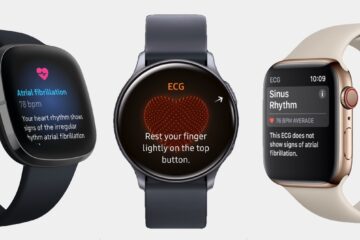
Some watches offer features such as irregular heart-rhythm notifications, ECG recordings, blood-oxygen estimates, temperature trends or fall detection. These functions are model-specific, may have age or region restrictions, and are not available on every device. Some features are intended for wellness or screening support and cannot diagnose or rule out a medical condition.
For example, Apple explains that Fall Detection can help contact emergency services after a hard fall on supported models and settings, but it cannot detect every fall. Treat safety features as an additional layer of support, not a guarantee that help will always be summoned.
The FDA has specifically warned consumers not to rely on unauthorized smartwatch features that claim to measure blood pressure, and has warned that no smartwatch or smart ring is authorized to measure blood glucose on its own. If a health decision depends on an accurate reading, use an appropriate authorized medical device and speak with a qualified healthcare professional.
For more detail about using a watch for exercise, read our guide to Smartwatch Fitness Tracking. For a different use case, see our guide to Smartwatches for Hiking.
What Makes a Smartwatch Easy to Use?
A long feature list does not automatically make a watch user-friendly. Before choosing one, consider the parts of the experience you will interact with every day.
| What to check | Why it matters | What to look for |
|---|---|---|
| Display | You need to read the screen quickly, indoors and outdoors | Adjustable brightness, readable text, adequate screen size and always-on options if wanted |
| Controls | Small touch targets and complex menus can be frustrating | Simple menus, responsive touchscreen, useful physical buttons or a rotating crown |
| Phone compatibility | Some watches lose features or cannot pair with certain phones | Official support for your exact iPhone or Android model and operating-system version |
| Battery and charging | Frequent charging can interrupt sleep tracking and daily use | Battery life that suits your routine, convenient charging and clear battery information |
| Comfort and fit | A heavy or irritating watch may stay in a drawer | Reasonable weight, suitable case size, adjustable strap and skin-friendly contact materials |
| Accessibility | Readable screens and alternative controls can make the watch easier for more people | Text-size options, high contrast, voice control, haptic alerts and screen-reader support where offered |
| App experience | Data and settings are often managed on the phone | A stable companion app, understandable menus and useful settings without excessive subscriptions |
| Privacy and security | Watches can collect location, activity and health information | Device lock, clear permission controls, account security and options to manage or delete stored data |
Is a Smartwatch Worth It for Everyday Use?
A smartwatch is likely to be useful if you regularly exercise, want to see selected notifications without checking your phone, use reminders or navigation, or value activity and sleep trends. It may be less useful if you mainly want to tell the time, dislike charging another device, prefer fewer notifications or do not plan to use its connected features.
| A smartwatch may suit you if | You may not need one if |
|---|---|
| You want convenient call and message alerts | You rarely use phone notifications |
| You track walking, workouts or sleep trends | You prefer a basic pedometer or a traditional watch |
| You use timers, maps, reminders or contactless payments | You do not want to manage another app or account |
| You value supported safety and accessibility features | You expect the watch to replace medical or emergency equipment |
| You are comfortable charging it regularly | You want a watch that runs for months without charging |
Smartwatch Limitations to Consider Before Buying
- Battery life: Bright displays, GPS, cellular service, music and frequent health measurements can shorten time between charges.
- Phone dependence: Some watches need a nearby phone for calls, messages, data syncing or app setup. Cellular models may require a separate carrier plan.
- Compatibility: Not every watch works with both Android and iPhone, and features can be restricted across phone ecosystems.
- Subscription costs: Some advanced fitness, coaching, music or cloud features may require a paid plan.
- Sensor estimates: Calories, sleep stages and some health metrics are estimates that can be inaccurate.
- Privacy: Review which apps receive location, health and notification data. Use a passcode and secure the account linked to the watch.
- Repair and replacement: Screens, batteries and proprietary straps can be expensive or difficult to replace on some models.
User-Friendly Smartwatch FAQs
1. What Makes a Smartwatch User-Friendly?
A user-friendly smartwatch has a clear display, simple menus, comfortable fit, reliable phone connection, useful notifications and battery life that fits your routine. Accessibility controls and an easy-to-understand companion app also make a difference.
2. Are Smartwatches Useful for Everyday Life?
They can be useful for checking calls and messages, setting reminders, tracking activity, recording sleep trends, using timers and getting navigation prompts. They are most worthwhile when you regularly use several of those features rather than buying one for a long list of functions you may never open.
3. Can a Smartwatch Measure Blood Pressure Accurately?
Do not assume that a smartwatch can provide an accurate blood-pressure measurement. The FDA warns against using unauthorized wearable features that claim to measure or estimate blood pressure. Use an appropriate FDA-authorized monitor when accurate readings are needed.
4. Can a Smartwatch Measure Blood Sugar?
The FDA says it has not authorized, cleared or approved a smartwatch or smart ring that measures or estimates blood glucose on its own. A watch may display information from a compatible authorized glucose-monitoring system, but it does not replace that device.
5. Do You Need a Smartphone to Use a Smartwatch?
Most smartwatches need a compatible phone for setup, account sign-in, app management and syncing. Some cellular watches can make calls or access selected online features without the phone nearby, but they may require a separate carrier plan. Offline functions vary by model.
6. How Often Does a Smartwatch Need Charging?
It depends on the watch and how you use it. Some full-featured smartwatches need daily or near-daily charging, while some fitness-focused watches last several days or longer. GPS, cellular use, an always-on display, music and overnight tracking can reduce battery life.
7. Can You Swim With Any Smartwatch?
No. Water resistance varies by model, and a watch marketed as water-resistant is not automatically suitable for swimming, diving or high-speed water sports. Check the manufacturer’s exact rating and care instructions before exposing it to water.
8. Are Smartwatch Fitness and Sleep Readings Reliable?
They can be useful for following personal trends, but accuracy varies by device, sensor, fit, activity and algorithm. Treat calorie estimates, sleep stages and other derived scores as approximations rather than clinical measurements or diagnoses.
9. Are Smartwatches Good for Older Adults?
They may help some older adults with reminders, activity tracking, emergency features and fall-detection options on supported models. Choose a watch with a readable screen, comfortable strap, simple controls and safety features that are compatible with the user’s phone and region. Fall detection does not identify every fall and should not be treated as a replacement for an emergency plan.
10. Is an Expensive Smartwatch Easier to Use Than a Budget Model?
Not necessarily. A more expensive watch may have a brighter screen or more sensors, but ease of use depends on the interface, phone compatibility, comfort and software. Compare the everyday experience and ongoing costs rather than choosing by price alone.
Editorial Note
This article discusses general smartwatch features and ease of use. Functions vary by manufacturer, model, phone, software version, country, carrier and subscription. A feature described here may not be available on every device or in every U.S. state. Check the official product and support pages before purchase.
Trusted Sources
- Consumer Reports Smartwatch and Fitness Tracker Buying Guide
- AARP Smart Guide to Wearable Health Technology
- FDA Safety Communication on Unauthorized Blood-Pressure Wearable Features
- FDA Safety Communication on Smartwatch Blood-Glucose Claims
- Apple Support: Fall Detection on Apple Watch
- Google Pixel Watch Help: Activity and Sleep Tracking
How This Guide Is Researched and Kept Current
This guide is reviewed against current smartwatch buying guidance, manufacturer support documents and U.S. health-device safety information. It distinguishes common functions, such as notifications and activity tracking, from model-specific features such as ECG, fall detection, offline music, cellular connectivity and advanced sleep insights.
Health and fitness readings are described as estimates where appropriate, and medical claims are checked against FDA guidance. Recommendations focus on practical usability, compatibility, accessibility, comfort, battery life, privacy and total cost rather than the number of features listed in a product advertisement. Readers can report an error or suggest a correction through the Top Reviewd Contact Page.
About the Author
Abdul Khader is a watch enthusiast, researcher and writer, and the person behind Topreviewd. He writes about luxury and designer watches, automatic and quartz movements, materials, sizing, straps, crystals and water resistance, comparing watches across different price points so readers can judge what they get for the money. His approach is practical. He checks specifications, points out when sources disagree, and keeps published details separate from his own opinion. Read more on the About Page, or reach him through the Contact Us Page.