Choosing a smartwatch for calls and texting starts with deciding whether you only need alerts and replies while your phone is nearby, or want to communicate when you leave it behind. Bluetooth calling, message notifications, app-based replies and independent LTE service are different features, and support varies by watch, phone, carrier and country. This guide explains the differences and what to check before you buy.
Quick answer: A Bluetooth smartwatch can usually handle calls and messages when it is connected to your nearby phone. An LTE or cellular smartwatch with an activated compatible plan can often make calls and send messages when your phone is not nearby. The exact features depend on the watch, phone, messaging app, carrier and country.
Last Updated: October 19, 2026
Written by Abdul Khader, watch enthusiast, researcher and writer at Topreviewd.
Best Smartwatch for Calls and Texting: What to Know First
The best smartwatch for calls and texting is not necessarily the model with the most features. Start with your phone, the way you want to communicate and whether you need to stay connected when you leave your phone behind. Some watches let you answer calls and reply to texts through a paired phone; cellular models can offer more independence, but usually involve extra device and carrier requirements.
At Topreviewd, our guides focus on helping readers compare features and understand practical limitations before choosing a device. Use the points below to check whether a watch will support the calls and messages you actually use.
Bluetooth vs LTE Smartwatch: Which One Can Call Without a Phone?
| Connection | What it usually supports | What to know |
|---|---|---|
| Bluetooth | Calls and message features through a paired phone nearby | Usually the lower-cost choice, but the phone needs to be close enough and connected. |
| Wi-Fi | Some online features when connected to a supported network | Wi-Fi does not automatically provide independent cellular calling or SMS. |
| LTE or cellular | Calls and supported messaging away from the phone | Requires a compatible watch, supported carrier and usually an activated plan or eSIM service. |
| Notification-only | Alerts for incoming calls and messages | Some watches display notifications but do not support answering calls or composing replies. |
Do not assume every watch advertised with “Bluetooth calling” can make independent calls. This feature often means you can use the watch’s microphone and speaker while the watch is connected to your phone. For example, Samsung’s official LTE activation instructions explain that cellular use depends on device and service setup.
What Can You Actually Do From a Smartwatch?
Answer and Make Phone Calls
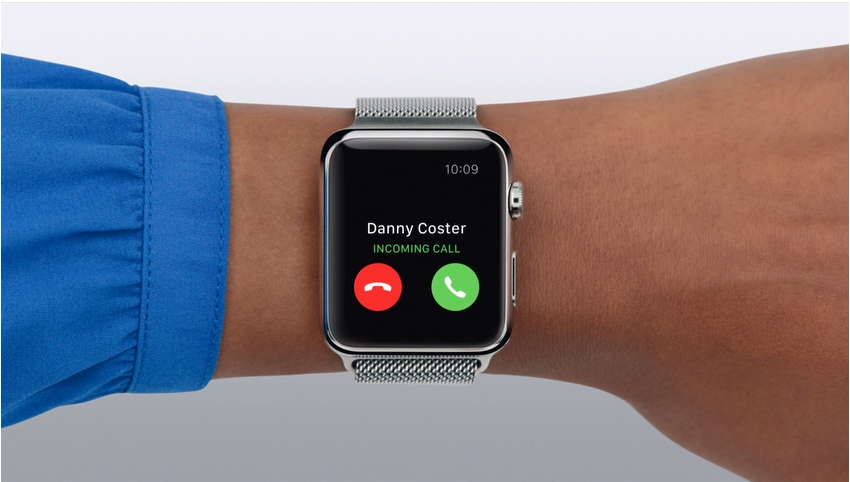
A watch with a speaker and microphone may let you answer or place calls from your wrist. With a Bluetooth model, the paired phone generally needs to be nearby. With a cellular model, calls away from the phone depend on the watch’s capabilities, carrier support and plan activation.
Read and Reply to Text Messages
Many smartwatches show incoming SMS or messaging notifications. Depending on the model and connected phone, you may be able to reply with preset responses, a keyboard, voice dictation or handwriting. Receiving a notification is not the same as being able to compose and send a reply, so confirm the exact feature before buying.
Use WhatsApp and Other Messaging Apps
Messaging app support varies by watch operating system, phone and app version. Some watches can show WhatsApp notifications or allow replies, while voice calling through WhatsApp may not be supported in the same way as ordinary cellular calls. Check the current app and watch documentation instead of relying on a generic “WhatsApp smartwatch” claim. For a market overview, see this independent guide to smartwatches with WhatsApp calling and messages in India.
Which Smartwatch Should You Choose for Your Phone?
For iPhone Users
Check compatibility with your iPhone model and iOS version first. Apple Watch is designed to work with iPhone, while many other smartwatch platforms have limited iPhone integration or may not support all calling and reply features. Apple’s official guide to Apple Watch notifications explains how notification settings work. The Apple Watch User Guide is also useful for checking model-specific functions.
For Android Users
Android users should check the watch’s supported phone models, required companion app and whether calling and message replies work with their preferred messaging apps. Google’s Pixel Watch help for calls and text messages explains relevant requirements and limitations.
For Budget Buyers
A lower-cost watch may be sufficient if your main goal is to see call alerts, reject calls or read message notifications. If you want to speak through the watch, verify that it has a microphone and speaker and supports Bluetooth calling. If you want independent calling, check cellular support and the ongoing plan cost before comparing prices.
How to Choose the Best Smartwatch for Calling and Texting
- Phone compatibility: Confirm your exact phone model and operating-system version are supported.
- Call support: Check whether the watch only shows call alerts, answers calls through your phone, or supports independent cellular calls.
- Text replies: Confirm whether it supports SMS replies, voice dictation, a keyboard or only notifications.
- Messaging apps: Check support for the apps you use, including any restrictions on voice calls.
- Cellular costs: Review carrier, eSIM, plan, roaming and activation requirements.
- Battery life: Cellular use, speakerphone calls, GPS and frequent notifications can increase battery consumption.
- Comfort and controls: Consider screen readability, microphone quality, speaker volume, button access and fit.
- Privacy: Review notification previews, lock settings and which apps can access messages or call data.
If ease of use matters as much as calling, see our guide to User-Friendly Smartwatches. iPhone shoppers can also review our Best Cheap Smartwatch for iPhone guide, then verify compatibility and current model specifications before purchase.
How to Set Up Calls and Texts on a Smartwatch
- Check compatibility. Confirm the watch works with your phone and required operating-system version.
- Install the companion app. Use the official app and follow its pairing instructions.
- Allow permissions. Enable the required call, contacts, SMS and notification permissions on your phone and watch.
- Test Bluetooth calling. Keep the phone nearby, make a test call and check microphone and speaker quality.
- Configure replies. Open the watch’s notification or messaging settings and confirm which reply methods are available.
- Activate cellular service if needed. Follow the manufacturer’s and carrier’s official instructions for an eligible LTE model and plan.
- Test away from the phone. If independent use matters, safely test calling and supported messages after cellular activation rather than assuming the feature is enabled.
For more pairing help, follow our step-by-step guide on How to Connect a Smartwatch to Android or iPhone.
Common Problems With Smartwatch Calls and Texting
Calls Work Only When the Phone Is Nearby
This is normal for many Bluetooth-only watches. Check whether the watch supports LTE, whether your carrier supports that model, and whether the cellular plan has been activated.
Messages Arrive but You Cannot Reply
Some models only display notifications, and reply options can differ between Android and iPhone. Check the messaging app’s support, notification permissions and the watch’s operating-system version.
WhatsApp Calls Do Not Work
WhatsApp message notifications and replies do not guarantee support for WhatsApp voice calls. Check current official app information and watch documentation for the exact model.
Battery Drains Quickly
Frequent calls, LTE, weak cellular signal, always-on display and continuous notifications can use more power. Try reducing unnecessary alerts and display activity, and compare battery estimates under realistic use rather than relying only on standby claims.
Cellular Service Will Not Activate
Confirm the watch is a cellular model, your carrier supports it, your phone and watch meet the carrier’s requirements, and the plan or eSIM has been provisioned correctly. Carrier availability and plan details can change, so check current local support before purchase.
Are Smartwatches for Calls and Texting Worth It?
A smartwatch is useful when you want to handle brief calls and messages without constantly reaching for your phone. A Bluetooth model can be practical for everyday use when your phone is nearby. A cellular model is worth considering if you regularly leave your phone behind and are comfortable with the extra setup, supported-carrier requirements and potential monthly cost.
Before choosing a model, compare the exact call and reply functions, phone compatibility, app support, battery expectations and total cost. Product names and marketing descriptions are not enough to establish that every messaging feature will work in your situation.
Frequently Asked Questions
Can a smartwatch make calls and send texts without a phone?
Some LTE or cellular smartwatches can make calls and send supported messages without the phone nearby when paired with compatible service. Bluetooth-only watches generally depend on a connected phone for these functions.
Do all smartwatches let you reply to text messages?
No. Some watches only show message notifications. Reply methods can include preset responses, voice dictation or an on-screen keyboard, depending on the watch, phone and messaging app.
Can I use WhatsApp on a smartwatch?
Support varies. A watch may display WhatsApp alerts or allow certain replies without supporting every WhatsApp feature, including voice calls. Check current compatibility for your exact watch and phone.
What is the difference between a Bluetooth and LTE smartwatch for calling?
A Bluetooth watch typically uses a nearby paired phone for calling. An LTE watch can often connect to a cellular network independently, but requires compatible hardware, carrier support and service activation.
Can I make calls from a smartwatch paired with an iPhone?
It depends on the watch and its iPhone compatibility. Apple Watch is designed for iPhone, while other watches may offer fewer calling, notification or message-reply features with iOS.
Can I send SMS from a Pixel Watch?
Pixel Watch calling and messaging support depends on the model, phone connection, cellular configuration and service availability. Consult the official Pixel Watch calls and text messages help page for current requirements.
Does a smartwatch need a SIM card for calling?
Bluetooth calling through a paired phone usually does not require a separate watch SIM. Independent cellular calling generally requires an LTE watch and a supported cellular plan, often provisioned through an eSIM rather than a physical SIM.
Do smartwatch calls and texts work in India?
They can, but independent cellular use depends on the specific watch model and Indian carrier support. Check current carrier compatibility, plan terms, activation requirements and messaging-app support before buying.
How This Guide Is Researched and Kept Current
This guide is based on manufacturer documentation, official support pages and relevant independent coverage of smartwatch calling and messaging. We use those sources to explain compatibility, setup requirements and the difference between Bluetooth-connected features and independent cellular service. Because features can vary by model, phone, app version, carrier and country, readers should confirm current specifications and service availability before purchase.
This is research-based guidance, not a claim that every smartwatch mentioned or category discussed has been hands-on tested. If you spot a detail that needs updating or have a question about our editorial process, please Contact Us.
About the Author
Abdul Khader is a watch enthusiast, researcher and writer at Topreviewd. He writes practical guides that help readers compare watch features, understand limitations and make informed decisions across different budgets. His approach is to check manufacturer specifications, consult official support documentation, compare relevant independent sources and distinguish published facts from estimates or opinion.
For smartwatch guides, Abdul focuses on practical questions such as phone compatibility, calling and messaging features, setup requirements and ongoing costs, while making clear that capabilities can differ by model and region. Learn more about Topreviewd and its editorial approach, or Contact Us with feedback or corrections.